 |
|||||||||||||||||||||||||||||||
| combobox控制項 1.加入項目 元件.addItem 字串值 2.項目索引控制項 3.元件.clear =>清除combobox項目 Dim s(4) As String Dim lencount As Integer '總長度 Dim p As Integer '指標 |
|||||||||||||||||||||||||||||||
| 固定位置換成不固定位置 絕對位址與相對位址 Dim strpath as string strpath=ActiveWorkbook.path 擷取目前檔案路徑 Right(str,1) 從右邊取 一個 自 元 Left(str,1) 從左邊取 一個字元 Len(str) 計算字串長度 split(str,"符號") 遇符號時將字串分割,回傳陣列 | |||||||||||||||||||||||||||||||
| ====================================== UserForm基礎 un |
|||||||||||||||||||||||||||||||
|
|
|
||||||||||||||||||||||||||||||
|
|
|
|
|||||||||||||||||||||||||||||
2015年8月14日 星期五
0814 note

2015年8月12日 星期三
8012 note
格式化物件:FormatConditions
with 範圍物件.FormatConditions
.Delete
.Add Type:=x,Operator:=y,Formula1:=z
.Item(1).Interior.color=RGB(r,g,b)
end with
將物件設定給變數
Dim k as range
set k=Range("c2:e9")
Opertor
1.xlBetween ->介於 兩個formula1 and formula2
2.xlEqual 等於
3.xlGreater 大於
4.xlGreaterEqual 大於等於
5.xlLess 小於
6.xlLessEqual 小於等於
7.xlNotBetween 不介於 兩個formula1 and formula2
8.xlNotEqual 不等於
Type
1.xlCellValue 儲存格的值
2.xlExpresion 公式
3.xlBlanksCondition 空白
4.xlTextString 文字字串
5.xlTop10 前10名的值
6.xlIconSet 圖示集
1.Formula:公式化條件值
formula1:=60,formila2:=80
2.Interior:指向背景
將不及格標示為紅色
Dim k As FormatConditions
Set k = Range("c2:e6").FormatConditions
With k
.Delete
.Add Type:=xlCellValue, Operator:=xlLess, Formula1:=60
.Item(1).Interior.Color = RGB(255, 0, 0)
End With
移除格式化
Dim k As FormatConditions
Set k = Range("c2:e6").FormatConditions
With k
.Delete
.Add Type:=xlCellValue, Operator:=xlLess, Formula1:=60
.Item(1).Interior.Color = xlNone
End With
標示空白資料
Private Sub CommandButton6_Click()
Dim k As FormatConditions
Set k = Range("c2:e6").FormatConditions
With k
.Delete
.Add Type:=xlBlanksCondition
.Item(1).Interior.Color = RGB(0, 255, 0)
End With
End Sub
with 範圍物件.FormatConditions
.Delete
.Add Type:=x,Operator:=y,Formula1:=z
.Item(1).Interior.color=RGB(r,g,b)
end with
將物件設定給變數
Dim k as range
set k=Range("c2:e9")
Opertor
1.xlBetween ->介於 兩個formula1 and formula2
2.xlEqual 等於
3.xlGreater 大於
4.xlGreaterEqual 大於等於
5.xlLess 小於
6.xlLessEqual 小於等於
7.xlNotBetween 不介於 兩個formula1 and formula2
8.xlNotEqual 不等於
Type
1.xlCellValue 儲存格的值
2.xlExpresion 公式
3.xlBlanksCondition 空白
4.xlTextString 文字字串
5.xlTop10 前10名的值
6.xlIconSet 圖示集
1.Formula:公式化條件值
formula1:=60,formila2:=80
2.Interior:指向背景
將不及格標示為紅色
Dim k As FormatConditions
Set k = Range("c2:e6").FormatConditions
With k
.Delete
.Add Type:=xlCellValue, Operator:=xlLess, Formula1:=60
.Item(1).Interior.Color = RGB(255, 0, 0)
End With
移除格式化
Dim k As FormatConditions
Set k = Range("c2:e6").FormatConditions
With k
.Delete
.Add Type:=xlCellValue, Operator:=xlLess, Formula1:=60
.Item(1).Interior.Color = xlNone
End With
標示空白資料
Private Sub CommandButton6_Click()
Dim k As FormatConditions
Set k = Range("c2:e6").FormatConditions
With k
.Delete
.Add Type:=xlBlanksCondition
.Item(1).Interior.Color = RGB(0, 255, 0)
End With
End Sub
2015年8月10日 星期一
810 note
vba:
1.變數宣告
2.資料型態
3.vb敘述
4.陣列
5.副程式架構
6.函數架構=>類別
===========
this Workbook
sheet1
sheet2
sheet3
modul
表單
類別物件型態
====================
試算表基礎物件
Application 應用程式
worksheet 活頁簿
range
cell
===================
Sub Auto_Open()
MsgBox "歡迎使用系統"
CommandBars("cell").Reset
With CommandBars("cell").Controls.Add
.Caption = "自訂功能巨集一"
.onAction="自訂副程式名稱"
End With
End Sub
-----------------------------
寫在module裡
1.變數宣告
2.資料型態
3.vb敘述
4.陣列
5.副程式架構
6.函數架構=>類別
===========
this Workbook
sheet1
sheet2
sheet3
modul
表單
類別物件型態
====================
試算表基礎物件
Application 應用程式
worksheet 活頁簿
range
cell
===================
Sub Auto_Open()
MsgBox "歡迎使用系統"
CommandBars("cell").Reset
With CommandBars("cell").Controls.Add
.Caption = "自訂功能巨集一"
.onAction="自訂副程式名稱"
End With
End Sub
-----------------------------
寫在module裡
Sub Auto_Close()
MsgBox "謝謝使用系統"
End Sub
Sub Auto_Open()
MsgBox "歡迎使用系統"
CommandBars("cell").Reset '使用前先reset
CommandBars("cell").Controls(1).BeginGroup = True '使用group,分開內定之功能
With CommandBars("cell").Controls.Add(before:=1)
.Caption = "自訂功能巨集一"
.OnAction = "hope1"
End With
With CommandBars("cell").Controls.Add(before:=2)
.Caption = "自訂功能巨集二"
.OnAction = "hope2"
End With
End Sub
Public Sub hope1()
MsgBox "副程式執行區塊"
End Sub
Public Sub hope2()
MsgBox "this is hope world"
End Sub
-----------------------------------------------
do....while
do while condition
[code area]
loop
ex: 1+2+3....+10=55
Private Sub addsum()
Dim total As Integer
Dim i As Integer
i = 1
Do While i <= 10
total = total + i
i = i + 1
Loop
MsgBox total
End Sub
===================
Public Function fun1()
MsgBox "函數架構一"
End Function
Public Function fun2(ByVal a As inteter, ByVal b As Integer)
Dim c As Integer
c = a + b
MsgBox c
End Function
Public Function fun3(ByVal x As inteter, ByVal y As Integer) As Integer
Dim total As Integer
total = x + y
fun3 = total
End Function
===================
建立類別元件方式
Dim comp1 as new Ani
comp1.函數()
程式執行流程
request(事件要求)
試算表====按鈕事件====類別元件
response(回應要求)
======================================
Private Sub CommandButton3_Click()
Dim sn As String
sn = CommandButton3.Caption
If sn = "走勢圖" Then
CommandButton3.Caption = "清除"
Range("f2:f6").SparklineGroups.Add Type:=xlSparkLine, SourceData:="c2:f6"
Else
CommandButton3.Caption = "走勢圖"
Range("f2:f6").SparklineGroups.Clear
End If
End Sub
do....while
do while condition
[code area]
loop
ex: 1+2+3....+10=55
Private Sub addsum()
Dim total As Integer
Dim i As Integer
i = 1
Do While i <= 10
total = total + i
i = i + 1
Loop
MsgBox total
End Sub
===================
Public Function fun1()
MsgBox "函數架構一"
End Function
Public Function fun2(ByVal a As inteter, ByVal b As Integer)
Dim c As Integer
c = a + b
MsgBox c
End Function
Public Function fun3(ByVal x As inteter, ByVal y As Integer) As Integer
Dim total As Integer
total = x + y
fun3 = total
End Function
===================
建立類別元件方式
Dim comp1 as new Ani
comp1.函數()
程式執行流程
request(事件要求)
試算表====按鈕事件====類別元件
response(回應要求)
======================================
Private Sub CommandButton3_Click()
Dim sn As String
sn = CommandButton3.Caption
If sn = "走勢圖" Then
CommandButton3.Caption = "清除"
Range("f2:f6").SparklineGroups.Add Type:=xlSparkLine, SourceData:="c2:f6"
Else
CommandButton3.Caption = "走勢圖"
Range("f2:f6").SparklineGroups.Clear
End If
End Sub
2015年8月5日 星期三
805 note
錯誤處理
1.Err.clear
將日誌錯誤刪除
2.刪除試算表所有空白列
總行列數:1048576
A:A1048576
3on error resume next
忽略error繼續執行
Private Sub Workbook_Open()
Err.Clear
On Error Resume Next
Dim r As Double
r = Sheets(1).Rows.Count
' MsgBox r
Sheets(1).Range("A1:A" & r).SpecialCells(xlCellTypeBlanks).EntireRow.Delete
End Sub
4.on error goto label
.
.
.
.
label:
.
.
workbooks(filename).save
--------------------------------------------
VBA一維陣列
宣告:
Dim 陣列名稱(數量) Integer
ex: dim s(2) as integer
-----------------------------------------------
Private Sub CommandButton1_Click()
' Dim s(2) As Integer
' s(0) = 30
' s(1) = 40
' s(2) = 50
' MsgBox LBound(s) & ":" & UBound(s)
On Error GoTo label1
Dim data(4) As String
Dim i As Integer
For i = LBound(data) To UBound(data)
data(i) = Sheets(1).Cells(3, i + 1).Value
Next
exit sub
' MsgBox data(1)
label1:
MsgBox "系統程式錯誤,請檢察索引值"
End Sub
----------------------------------
Private Sub CommandButton2_Click()
Dim data(4) As String
Dim cscore As Integer
Dim i As Integer
Dim j As Integer
Dim r As Integer
For i = 2 To 6
If Sheets(1).Cells(i, 3).Value < 60 Then
MsgBox Sheets(1).Cells(i, 3).Value
For j = LBound(data) To UBound(data)
Sheets(2).Cells(2 + i, j + 1).Value = Sheets(1).Cells(i, j + 1).Value
Next
End If
Next
Call dspace
End Sub
Private Sub dspace()
On Error Resume Next
r = Sheets(2).Rows.Count
Sheets(2).Range("A1:A" & r).SpecialCells(xlCellTypeBlanks).EntireRow.Delete
End Sub
------------------
選擇性
select case 變數
case 值1
.
.
case 值2
.
.
case else
.
.
end select
-------------------------
msg=msgbox(string1,vbYesNo,
string2)
-----------
0Sub Auto_Close()
MsgBox "謝謝使用系統"
End Sub
Sub Auto_Open()
MsgBox "歡迎使用系統"
CommandBars("cell").Reset
With CommandBars("cell").Controls.Add
.Caption = "自訂功能巨集一"
End With
End Sub
1.Err.clear
將日誌錯誤刪除
2.刪除試算表所有空白列
總行列數:1048576
A:A1048576
3on error resume next
忽略error繼續執行
Private Sub Workbook_Open()
Err.Clear
On Error Resume Next
Dim r As Double
r = Sheets(1).Rows.Count
' MsgBox r
Sheets(1).Range("A1:A" & r).SpecialCells(xlCellTypeBlanks).EntireRow.Delete
End Sub
4.on error goto label
.
.
.
.
label:
.
.
workbooks(filename).save
--------------------------------------------
VBA一維陣列
宣告:
Dim 陣列名稱(數量) Integer
ex: dim s(2) as integer
-----------------------------------------------
Private Sub CommandButton1_Click()
' Dim s(2) As Integer
' s(0) = 30
' s(1) = 40
' s(2) = 50
' MsgBox LBound(s) & ":" & UBound(s)
On Error GoTo label1
Dim data(4) As String
Dim i As Integer
For i = LBound(data) To UBound(data)
data(i) = Sheets(1).Cells(3, i + 1).Value
Next
exit sub
' MsgBox data(1)
label1:
MsgBox "系統程式錯誤,請檢察索引值"
End Sub
----------------------------------
Private Sub CommandButton2_Click()
Dim data(4) As String
Dim cscore As Integer
Dim i As Integer
Dim j As Integer
Dim r As Integer
For i = 2 To 6
If Sheets(1).Cells(i, 3).Value < 60 Then
MsgBox Sheets(1).Cells(i, 3).Value
For j = LBound(data) To UBound(data)
Sheets(2).Cells(2 + i, j + 1).Value = Sheets(1).Cells(i, j + 1).Value
Next
End If
Next
Call dspace
End Sub
Private Sub dspace()
On Error Resume Next
r = Sheets(2).Rows.Count
Sheets(2).Range("A1:A" & r).SpecialCells(xlCellTypeBlanks).EntireRow.Delete
End Sub
------------------
選擇性
select case 變數
case 值1
.
.
case 值2
.
.
case else
.
.
end select
-------------------------
msg=msgbox(string1,vbYesNo,
string2)
-----------
0Sub Auto_Close()
MsgBox "謝謝使用系統"
End Sub
Sub Auto_Open()
MsgBox "歡迎使用系統"
CommandBars("cell").Reset
With CommandBars("cell").Controls.Add
.Caption = "自訂功能巨集一"
End With
End Sub
--------------------------------
Private Sub Workbook_BeforeClose(Cancel As Boolean)
msg = MsgBox("確定要離開試算表嗎", vbYesNo, "登出")
If msg = vbYes Then
Cancel = False
Else
Cancel = True
End If
End Sub
2015年8月3日 星期一
803 note
Private Sub CommandButton1_Click()
Dim a As Integer
Dim b As Integer
Dim c As Integer
Dim total As Integer
Dim avg As Single
Dim ac As Integer
Dim rcount As Integer
' rcount = Worksheets("工作表1").UsedRange.Rows.Count
' MsgBox rcount
Range("A1").Select
ac = ActiveCell.Row
' MsgBox ac
If IsEmpty(Range("A" & (ac + 1))) = True Then
rcount = 1
MsgBox "a"
Else
rcount = Worksheets("工作表1").UsedRange.Rows.Count
MsgBox "b"
End If
MsgBox rcount
If TextBox1.Value <> "" And TextBox2.Value <> "" And TextBox3.Value <> "" Then
a = CInt(TextBox1.Value)
b = CInt(TextBox2.Value)
c = CInt(TextBox3.Value)
total = a + b + c
TextBox4.Value = CStr(total)
avg = total / 3
TextBox5.Value = CStr(Format(avg, ".00"))
Sheets(1).Cells(rcount + ac, 1).Value = TextBox1.Value
Sheets(1).Cells(rcount + ac, 2).Value = TextBox2.Value
Sheets(1).Cells(rcount + ac, 3).Value = TextBox3.Value
Sheets(1).Cells(rcount + ac, 4).Value = TextBox4.Value
Sheets(1).Cells(rcount + ac, 5).Value = TextBox5.Value
Else
MsgBox "資料不完整請重新輸入"
If TextBox1.Value = "" Then
TextBox1.Activate
ElseIf TextBox2.Value = "" Then
TextBox2.Activate
ElseIf TextBox3.Value = "" Then
TextBox3.Activate
End If
End If
End Sub
Private Sub CommandButton2_Click()
TextBox1.Value = ""
TextBox2.Value = ""
TextBox3.Value = ""
TextBox4.Value = ""
TextBox5.Value = ""
End Sub
Private Sub CommandButton3_Click()
Dim score As String
score = TextBox6.Value
Sheets(1).Range("A1").AutoFilter field:=4, Criteria1:=score
查詢範圍.AutoFilter Field:=欄位位置,criteria1:=條件值,criteria2:=條件值
End Sub
Private Sub CommandButton4_Click()
Sheets(1).Range("A1").AutoFilter
End Sub

Dim a As Integer
Dim b As Integer
Dim c As Integer
Dim total As Integer
Dim avg As Single
Dim ac As Integer
Dim rcount As Integer
' rcount = Worksheets("工作表1").UsedRange.Rows.Count
' MsgBox rcount
Range("A1").Select
ac = ActiveCell.Row
' MsgBox ac
If IsEmpty(Range("A" & (ac + 1))) = True Then
rcount = 1
MsgBox "a"
Else
rcount = Worksheets("工作表1").UsedRange.Rows.Count
MsgBox "b"
End If
MsgBox rcount
If TextBox1.Value <> "" And TextBox2.Value <> "" And TextBox3.Value <> "" Then
a = CInt(TextBox1.Value)
b = CInt(TextBox2.Value)
c = CInt(TextBox3.Value)
total = a + b + c
TextBox4.Value = CStr(total)
avg = total / 3
TextBox5.Value = CStr(Format(avg, ".00"))
Sheets(1).Cells(rcount + ac, 1).Value = TextBox1.Value
Sheets(1).Cells(rcount + ac, 2).Value = TextBox2.Value
Sheets(1).Cells(rcount + ac, 3).Value = TextBox3.Value
Sheets(1).Cells(rcount + ac, 4).Value = TextBox4.Value
Sheets(1).Cells(rcount + ac, 5).Value = TextBox5.Value
Else
MsgBox "資料不完整請重新輸入"
If TextBox1.Value = "" Then
TextBox1.Activate
ElseIf TextBox2.Value = "" Then
TextBox2.Activate
ElseIf TextBox3.Value = "" Then
TextBox3.Activate
End If
End If
End Sub
Private Sub CommandButton2_Click()
TextBox1.Value = ""
TextBox2.Value = ""
TextBox3.Value = ""
TextBox4.Value = ""
TextBox5.Value = ""
End Sub
Private Sub CommandButton3_Click()
Dim score As String
score = TextBox6.Value
Sheets(1).Range("A1").AutoFilter field:=4, Criteria1:=score
查詢範圍.AutoFilter Field:=欄位位置,criteria1:=條件值,criteria2:=條件值
End Sub
Private Sub CommandButton4_Click()
Sheets(1).Range("A1").AutoFilter
End Sub
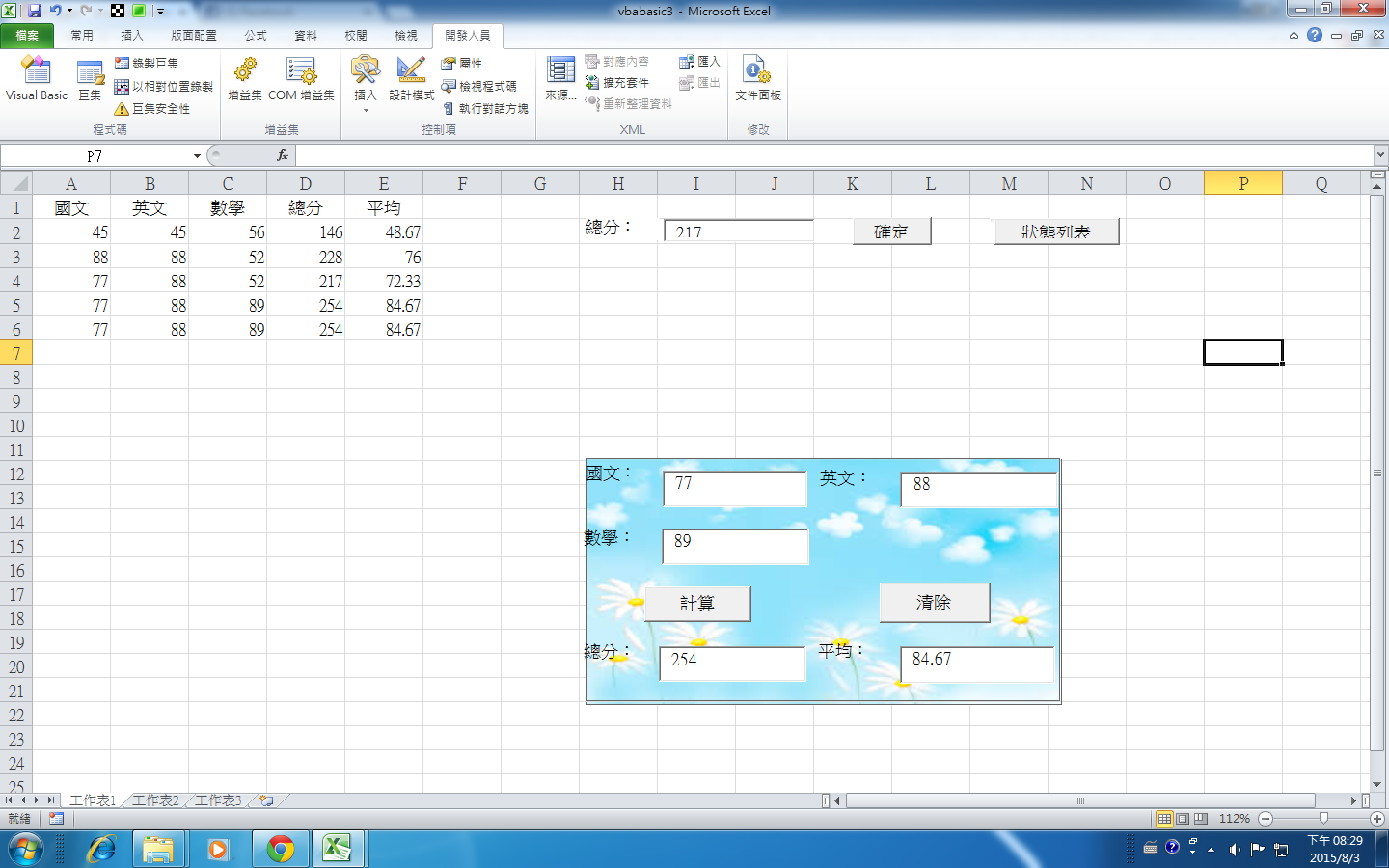
-------------------------------------
Private Sub TextBox1_KeyDown(ByVal KeyCode As MSForms.ReturnInteger, ByVal Shift As Integer)
If KeyCode = 13 Then
TextBox2.Activate
End If
End Sub
Private Sub TextBox2_KeyDown(ByVal KeyCode As MSForms.ReturnInteger, ByVal Shift As Integer)
If KeyCode = 13 Then
TextBox3.Activate
End If
End Sub
Private Sub TextBox3_KeyDown(ByVal KeyCode As MSForms.ReturnInteger, ByVal Shift As Integer)
If KeyCode = 13 Then
TextBox1.Activate
End If
End Sub
----------------------------------------
Private Sub CommandButton1_Click()
Call saveworkdata
End Sub
Public Sub saveworkdata()
Dim a As Integer
Dim b As Integer
Dim c As Integer
Dim total As Integer
Dim avg As Single
Dim ac As Integer
Dim rcount As Integer
' rcount = Worksheets("工作表1").UsedRange.Rows.Count
' MsgBox rcount
Range("A1").Select
ac = ActiveCell.Row
' MsgBox ac
If IsEmpty(Range("A" & (ac + 1))) = True Then
rcount = 1
Else
rcount = Worksheets("工作表1").UsedRange.Rows.Count
End If
' MsgBox rcount
If TextBox1.Value <> "" And TextBox2.Value <> "" And TextBox3.Value <> "" Then
a = CInt(TextBox1.Value)
b = CInt(TextBox2.Value)
c = CInt(TextBox3.Value)
total = a + b + c
TextBox4.Value = CStr(total)
avg = total / 3
TextBox5.Value = CStr(Format(avg, ".00"))
Sheets(1).Cells(rcount + ac, 1).Value = TextBox1.Value
Sheets(1).Cells(rcount + ac, 2).Value = TextBox2.Value
Sheets(1).Cells(rcount + ac, 3).Value = TextBox3.Value
Sheets(1).Cells(rcount + ac, 4).Value = TextBox4.Value
Sheets(1).Cells(rcount + ac, 5).Value = TextBox5.Value
Else
MsgBox "資料不完整請重新輸入"
If TextBox1.Value = "" Then
TextBox1.Activate
ElseIf TextBox2.Value = "" Then
TextBox2.Activate
ElseIf TextBox3.Value = "" Then
TextBox3.Activate
End If
End If
End Sub
Private Sub CommandButton2_Click()
Call thingdata
End Sub
Private Sub CommandButton3_Click()
Dim score As String
score = TextBox6.Value
Sheets(1).Range("A1").AutoFilter field:=4, Criteria1:=score
End Sub
Private Sub CommandButton4_Click()
Sheets(1).Range("A1").AutoFilter
End Sub
Private Sub TextBox1_KeyDown(ByVal KeyCode As MSForms.ReturnInteger, ByVal Shift As Integer)
If KeyCode = 13 Then
TextBox2.Activate
End If
End Sub
Private Sub TextBox2_KeyDown(ByVal KeyCode As MSForms.ReturnInteger, ByVal Shift As Integer)
If KeyCode = 13 Then
TextBox3.Activate
End If
End Sub
Private Sub TextBox3_KeyDown(ByVal KeyCode As MSForms.ReturnInteger, ByVal Shift As Integer)
If KeyCode = 13 Then
Call saveworkdata
Call thingdata
TextBox1.Activate
End If
End Sub
Public Sub thingdata()
TextBox1.Value = ""
TextBox2.Value = ""
TextBox3.Value = ""
TextBox4.Value = ""
TextBox5.Value = ""
End Sub
訂閱:
文章 (Atom)